
Test email like it behaves in production.
Zero-config locally. Public in minutes. Built for testing.
VaultSandbox is a self-hosted, receive-only SMTP testing gateway that behaves like a real SMTP server including TLS, DNS, authentication, spam filtering/scoring, and failure modes so your tests stop lying to you.
Stop testing email with mocks
Mocks answer one thing
"Did my app send an email?"
Everything else is usually invisible until production.
Production asks more
- Was TLS negotiated correctly?
- Did SPF, DKIM, and DMARC pass?
- What happens when the server grey-lists?
- What happens when connections drop?
- What happens when delivery is slow, flaky, or rejected?
Mocks don't test that. VaultSandbox is built to.
rejectUnauthorized: false sleep(5000) Three ways to deploy
Zero-config locally by design
You don't need to set up DNS or TLS to get started. Perfect for air-gapped or offline development.
# docker-compose.yml
services:
  vaultsandbox:
    image: vaultsandbox/gateway:latest
    ports:
      - '127.0.0.1:2525:25'
      - '127.0.0.1:8080:80'
    volumes:
      - vsb_data:/app/data

volumes:
vsb_data:- Capture emails instantly
- Use the Web UI, CLI, or SDKs
- Perfect for local development and CI
Secure by default
Without getting in your way
Receive-only
SMTP gateway
Built for QA and testing, not outbound delivery. Emails go in but never out.
Rate limiting and hardened defaults
Ready for public deployments out of the box. No open relay, ever.
Optional zero-knowledge encryption
Per-inbox encryption for sensitive data when you need it.
When you need realism, turn it on
VaultSandbox is designed to grow with your testing needs. Enable what production actually does.
Real SMTP behavior
- Proper SMTP handshake
- STARTTLS and SMTPS
- Protocol-level validation
Real authentication
- SPF, DKIM, DMARC validation
- Spam scoring (Rspamd)
- Content analysis & rule matching
- Reverse DNS
Real parsing
- MIME structure
- Attachments
- Headers
- Raw RFC 5322 access
Enable or disable features per inbox — different tests can behave differently on the same server.
Reproduce production failures
This is where VaultSandbox is different. Built-in SMTP chaos engineering, configured per inbox.
Inject latency
With configurable jitter
Simulate greylisting
451 temporary rejections
Drop connections
FIN or RST termination
Return SMTP errors
Specific error codes on demand
Blackhole messages
Accept but silently discard
Combine failure modes
Layer multiple behaviors
Test retries. Test backoff. Test the code paths you hope never run.
When your tests pass in VaultSandbox, you can trust production won't surprise you.
Email testing that works in CI
VaultSandbox is built for automation, not screenshots.
CLI & SDKs
-
waitfor emails deterministicallySSE-based, no polling
-
Match by subject, sender, regex
Or custom predicates
-
Extract verification links
Automatically parsed from email content
-
Structured JSON output
Pipeline-friendly for automation
No sleeps. No polling hacks. No flaky tests.
One pattern, every language
Same API shape across clients. Switch languages without relearning the flow.
import { VaultSandboxClient } from '@vaultsandbox/client';

const client = new VaultSandboxClient({
  url: process.env.VAULTSANDBOX_URL,
  apiKey: process.env.VAULTSANDBOX_API_KEY,
});
const inbox = await client.createInbox();

// Send real email via SendGrid/SES/etc.
await sendPasswordReset(inbox.emailAddress);

// Wait for arrival (SSE-based)
const email = await inbox.waitForEmail({ timeout: 10000 });
const link = email.links.find(l => l.includes('reset-password'));
expect(link).toBeDefined();Optional zero-knowledge security
When it matters
Most teams don't need encryption locally.
Some teams absolutely do.
VaultSandbox supports optional, per-inbox zero-knowledge encryption:
Encrypted on receipt
Emails can be encrypted immediately when they arrive
Client-side keys
Private keys stay on your machine
No plaintext storage
The server never stores unencrypted content
Disable when not needed
Can be turned off entirely for simplicity
Turn it on only when sensitive data demands it.
Built for teams, not demos
Per-inbox isolation
- Chaos rules
- Encryption policy
- Auth & spam analysis
- Webhooks
- TTLs and cleanup
Run multiple test environments on one gateway without interference.
Observability
- Real-time SSE streams
- Prometheus-style metrics
- Health checks for Docker & K8s
- Spam analysis with Rspamd
Webhooks
- Global or per-inbox routing
- Slack, Discord, Teams, Zapier
- Filter by sender, subject, headers
- HMAC-signed with auto retries
Interfaces developers actually use
Web UI
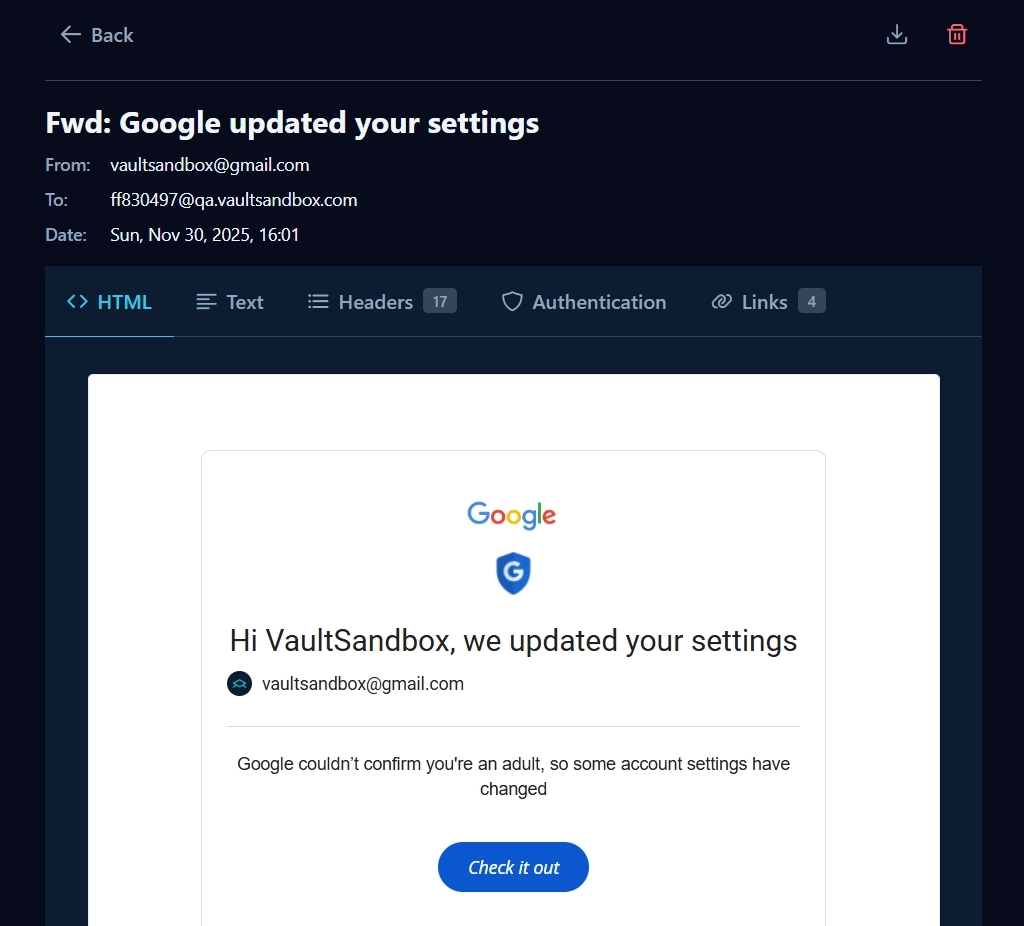
Debug emails visually with a full-featured web interface:
HTML & plain-text rendering
Auth & spam visualization
Attachments and link extraction
Dark mode
Email screenshot & EML export
Webhook & chaos configuration UI
CLI & TUI
For developers who live in the terminal:
Live inbox dashboard
Keyboard-driven navigation
Email inspection, chaos config, webhooks, metrics

Use what fits your workflow.
Who VaultSandbox is for
-
Teams tired of email tests passing locally and failing in production
-
Backend developers building password resets, verification flows, and notifications
-
QA teams testing retry logic and failure handling
-
Regulated industries that can't send test data to third parties
-
Anyone who knows email is not just text
Stay in touch with VaultSandbox
Subscribe for product updates, security releases, and deep dives on building production-grade email testing inside your VPC.
Future possibilities
We're considering these for teams that outgrow the core. Nothing is locked behind a paywall — the gateway is open source (Apache 2.0) and always will be.
Retention policies
Keep emails for days, weeks, or months. Meet compliance requirements without manual exports.
Audit logs
Track inbox creation, access, and deletion. Know who accessed what and when.
SSO
OIDC and SAML integration for your identity provider.
Shared inboxes
Collaborate across QA, dev, and support without duplicating infrastructure.
High availability
Run multiple gateways with automatic failover and zero downtime.
Priority support
Direct access to the team behind VaultSandbox.
If any of these matter to you, let us know — it helps us prioritize. Join the discussion on GitHub
Is it really free?
Yes. The core gateway is Apache 2.0 and free forever — no limits on inboxes, messages, or domains. We only charge for optional enterprise features (SSO, audit logs, retention).
Do I need a public IP?
No. Run locally with no external access. When you need real TLS and DNS validation, expose ports 25/80/443 and use vsx.email or your own domain.
Won't port 25 get spammed?
No. VaultSandbox only accepts mail for domains you configure. Unknown recipients are rejected at RCPT TO. Rate limiting blocks abusive IPs. No open relay.
How long are emails stored?
Until the container restarts (in-memory by default), until inbox TTL expires, or until you delete the inbox. VaultSandbox Teams adds configurable retention.
Get started in minutes
- Run locally with one command
- No signup required
- Full documentation and examples